Appearance
Organisation & Distribution Registry
Business Context
Business-Level Definition
The registry of subjects (Subjekty) is the single list of every organisation and natural person that appears in a client's data — the owner or manager of a building, the subscriber of a gauge, the client itself. Everywhere in the product one record is called a subject; there are no separate lists of companies and of people. In the data model and the API the record keeps the name organisation, covering natural persons as well.
A subject can hold several roles at once. Roles are never typed in: the product derives them from where the subject is used and shows all of them. The legal form (právní forma) is the only classification; it is optional, prefilled from ARES, and changes nothing else in the product.
The client works with the registry on the Subjekty tab: an overview, a common detail, adding a subject by hand or from ARES, and an export. Screens that link a subject (the building's owner and managers, the gauge's subscriber) pick from the same registry, and the screens keep the shared table and form components, with Organizace renamed to Subjekt.
The distribution-network part of this feature (gas and electricity distributors) is not analysed yet — see Distribution registry.
Requirements Definition
The client needs to answer simple questions reliably — who owns this building, which buildings does ABC manage, which supply points is ABC the subscriber of — and to keep one record per subject rather than the same company typed differently on every screen.
Three rules follow from the business requirement (Confluence Subjekty – business zadání, page 737935361):
- One list, one detail. Organisations and natural persons share the overview and the detail form; fields that do not apply stay empty.
- Roles come from use. A subject is an owner because a building names it as owner; when the last such link goes, the role goes. Nobody maintains a role by hand.
- ARES helps, never gates. ARES prefills and refreshes data; a subject that ARES does not know (a non-business natural person, a foreign company) is created and maintained by hand.
Technical Context
User Stories / Use Cases
- As an energy manager, I want to see all subjects of my client in one list with their roles, so I know who owns and manages what.
- As an energy manager, I want to filter the list by one or more roles and by legal form, so I can find, for example, every manager of my buildings.
- As an energy manager, I want to open a subject and see how many buildings it owns, manages or manages by delegation and how many supply points it subscribes, and jump to those lists.
- As an energy manager, I want to add a subject by IČO or name from ARES, or by hand when ARES does not know it.
- As an energy manager, I want to be stopped when I try to add a subject whose IČO is already in the registry, and to be taken to the existing one.
- As an energy manager, I want to export the whole subject list, as filtered, to XLSX.
- As an energy manager, I want to delete a subject that is no longer used, and to see where it is still used when deletion is not possible.
Row-by-row inventory of the places the requirement touches, with the questions for business confirmation: use-cases.md.
UI/UX Design
Screen drafts, their exported markup and the handoff notes for an implementing agent (components, tokens, measurements): design/. They build on Figma 1392:25123, 1392:25361 and 583:9751; where a draft and the criteria below disagree, the criteria win.
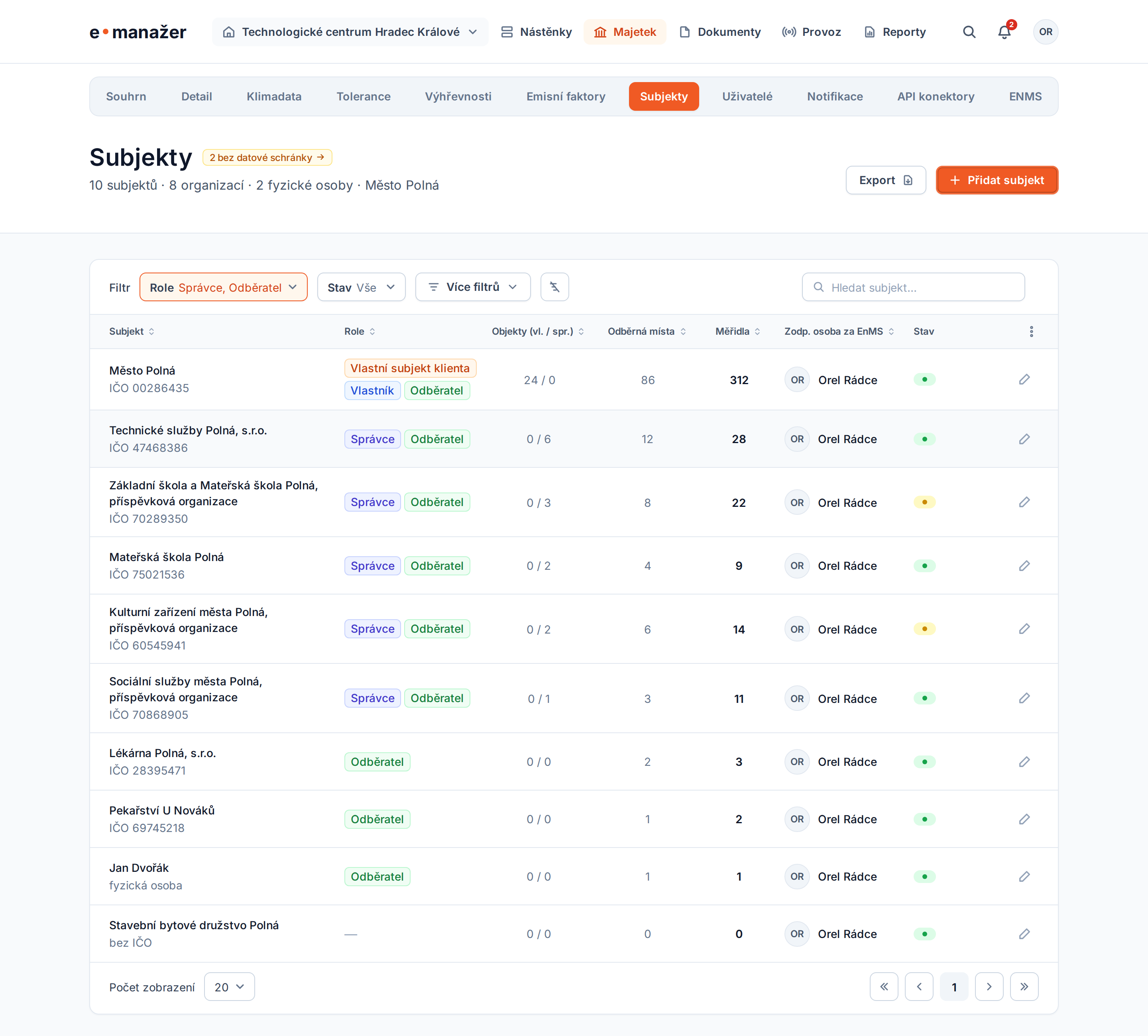
Entry point. Client section → tab Subjekty (/client/subjekty).
Overview.
| Element | Behaviour |
|---|---|
| Header | Title Subjekty; count of subjects split by organisations and natural persons (from the legal form); data-box notice; actions Export and Přidat subjekt |
| Filters | Role (multi-select; a subject matches if it holds any selected role), Stav (V pořádku, K řešení — there is no separate Vše / K řešení switch), Více filtrů (holds Právní forma) and reset, aligned left; search by name (contains) or IČO (exact) on its own at the right |
| Rows | A click anywhere on the row opens the detail; the only row action is the pencil (Upravit), which opens the same page |
| Roles | Shown as badges (see Role badges below); a subject with several roles shows several badges, wrapping within the cell |
| Column settings | Three-dot menu in the table header, per the table standard (Table View Settings, table key organisations) |
Columns (catalogue for the table standard):
| Column | Default | Mandatory | Sortable | Content |
|---|---|---|---|---|
| Subjekt | yes | yes | yes | Name; second line IČO (and legal form), or the legal form alone |
| Role | yes | no | no | Every role of the subject, one per line, in fixed order: Vlastní subjekt klienta, Vlastník, Přenesená správa, Správce, Odběratel. No role → dash |
| Objekty (vl. / spr.) | yes | no | yes (by total) | Counts of live buildings owned / managed, where managed includes delegated management |
| Odběrná místa | yes | no | yes | Count of distinct supply points of live gauges the subject subscribes |
| Měřidla | yes | no | yes | Count of live gauges the subject subscribes |
| Zodp. osoba za EnMS | yes | no | yes | contactEnmsUserId user |
| Stav | yes | no | no | Status dot: green = in order, yellow = K řešení |
| Právní forma, DIČ, E-mail, Adresa sídla, ID datové schránky, PXE | no | no | yes | Plain values |
| Řádkové akce | yes | yes | no | Pencil only (the row itself opens the detail) |
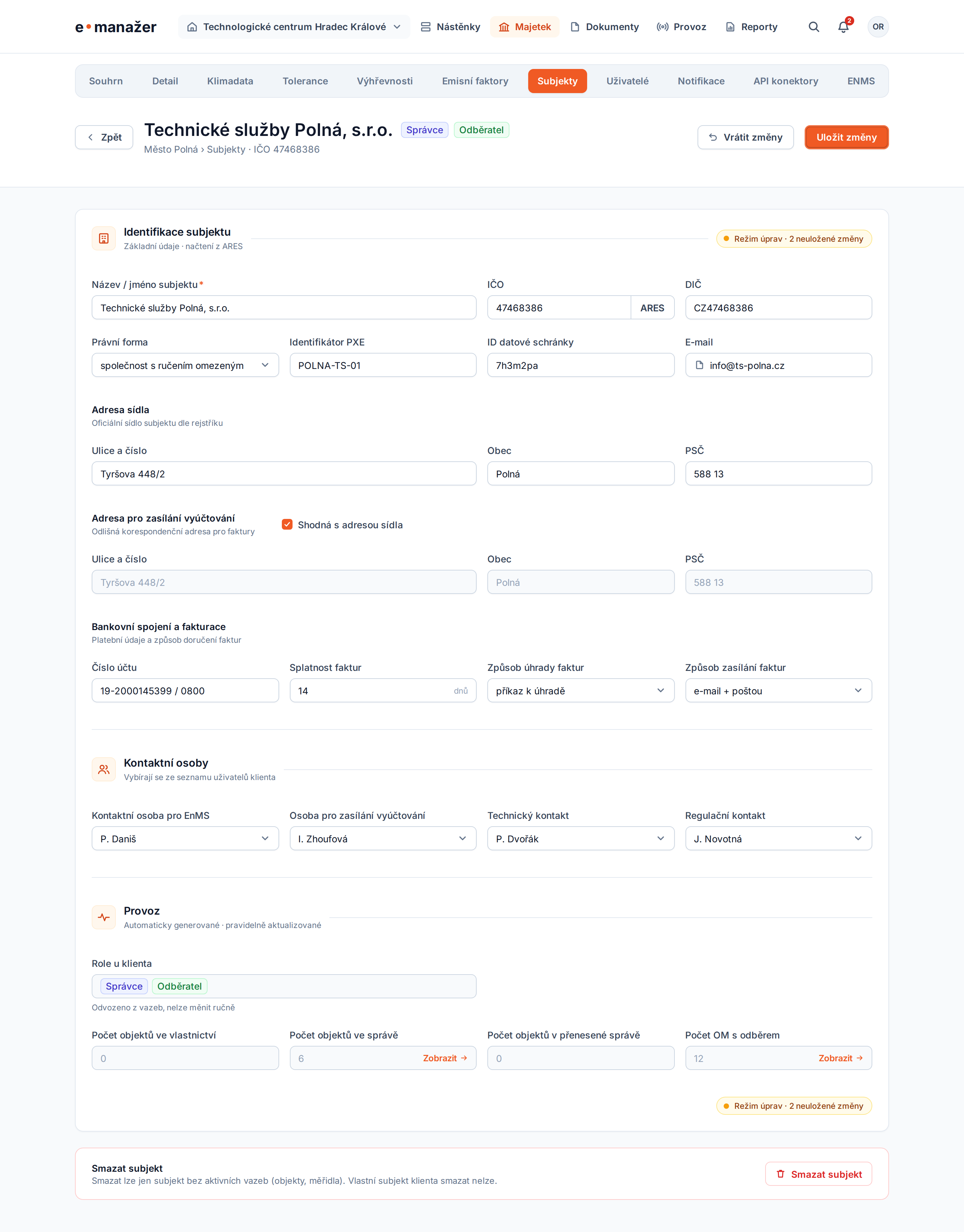
Detail. One form for every subject, in three cards:
- Identifikace subjektu: Název / jméno subjektu (required), IČO with ARES lookup, DIČ, Právní forma, Identifikátor PXE, ID datové schránky, E-mail; Adresa sídla and Fakturační adresa (Ulice a číslo, Obec, PSČ — the address model the system uses) with "Shodná s adresou sídla"; Bankovní spojení a fakturace.
- Kontaktní osoby: EnMS, billing, technical, regulatory — each a user of the client.
- Provoz: read-only Role u klienta (odvozeno z vazeb) as badges, and read-only counts Počet objektů ve vlastnictví, ve správě, v přenesené správě and Počet OM s odběrem, each with a Zobrazit link to the building or gauge overview filtered to this subject and role.
The header shows the name, the breadcrumb with IČO and every role as a badge; its actions are Vrátit změny and Uložit změny. Deletion sits at the end of the page as a Smazat subjekt block with a trash icon.
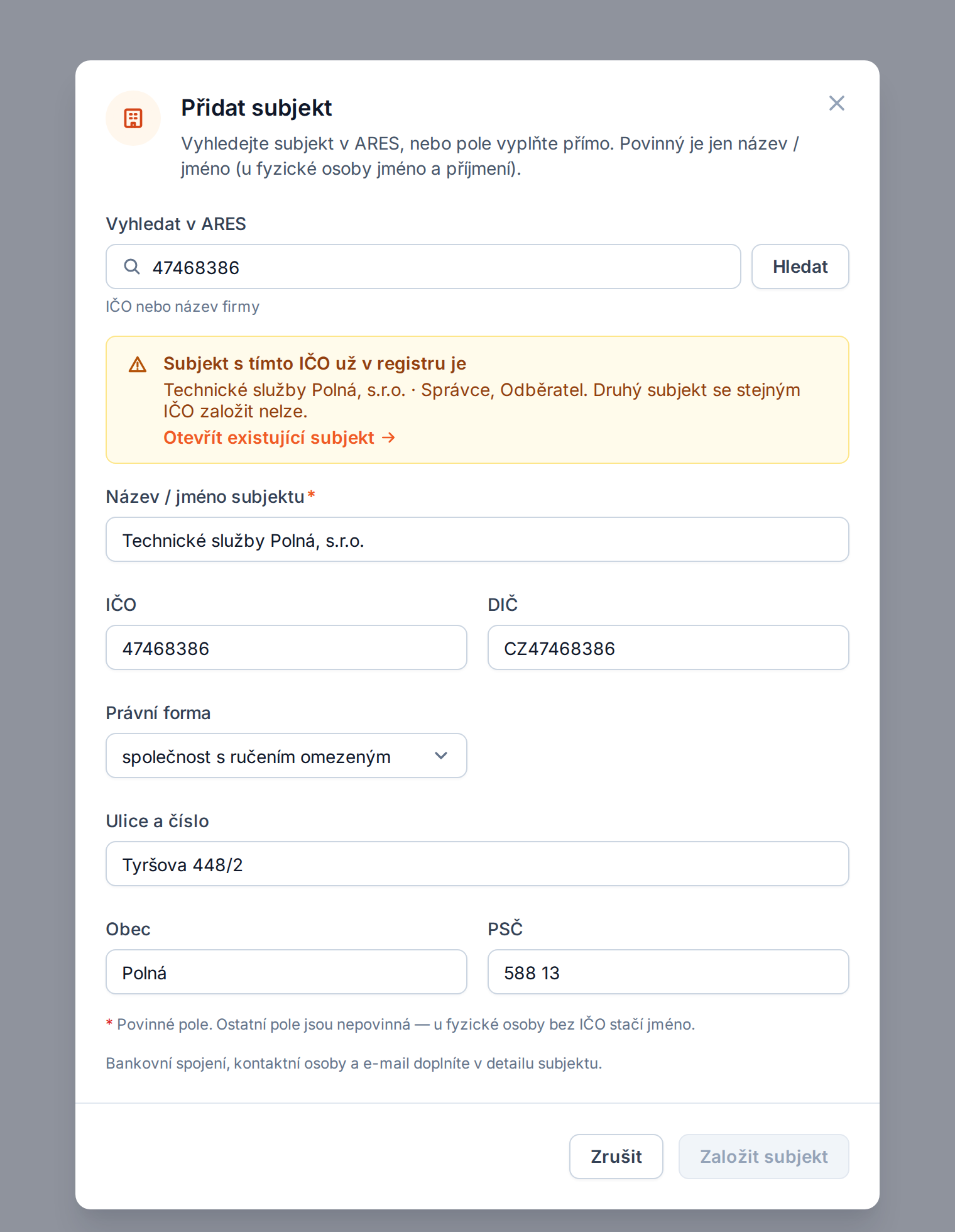
Add subject. A dialog: ARES search (IČO or name) prefills name, legal form, DIČ, address and data box; the fields can also be filled directly (no Vyplnit ručně action). Only Název / jméno subjektu is required, and an IČO held by a live subject blocks saving.
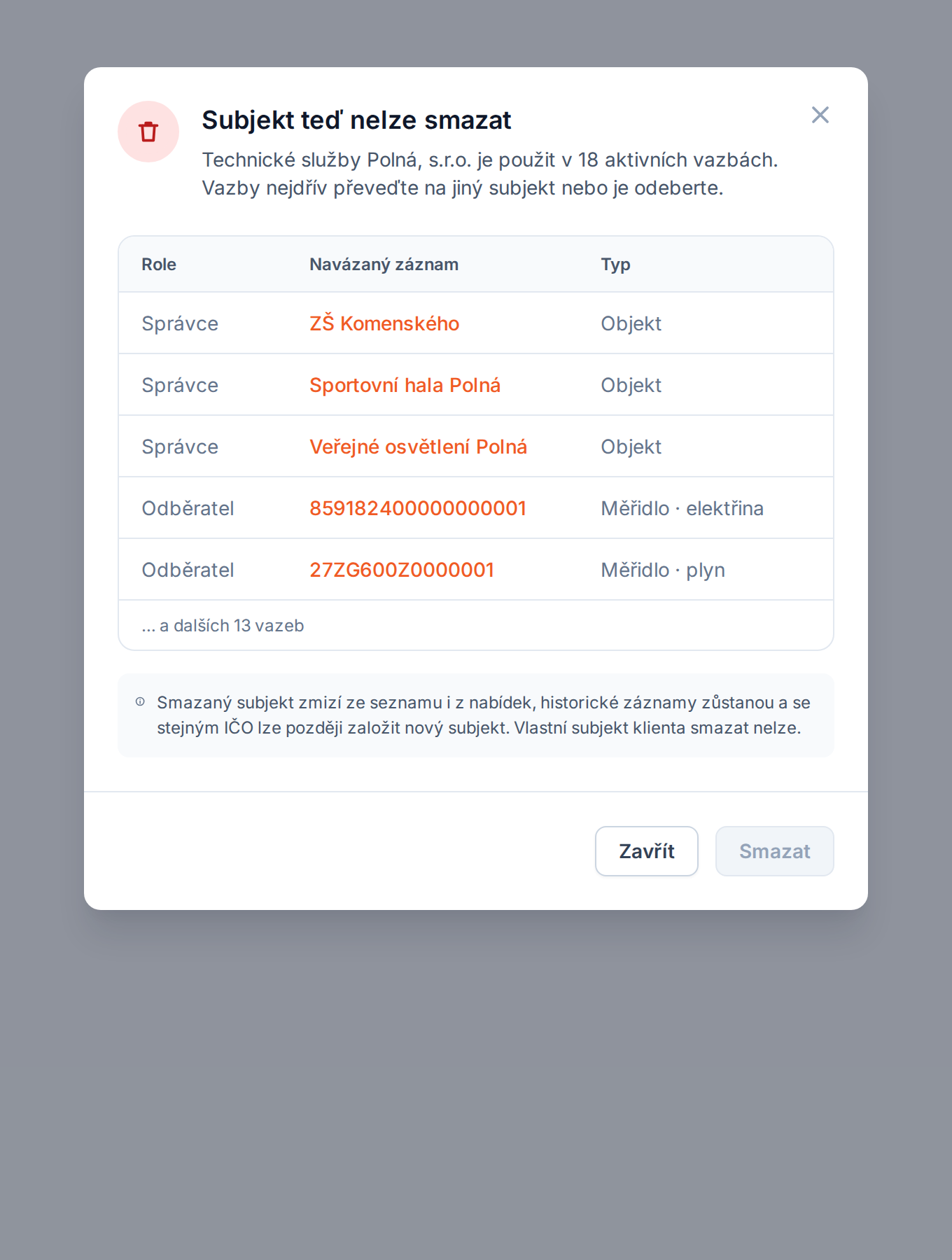
Delete. Smazat subjekt opens a dialog. For the client's own subject, or one still referenced, it explains why deletion is impossible and lists the references (role, linked record, state) with the delete button disabled; otherwise it confirms the deletion.
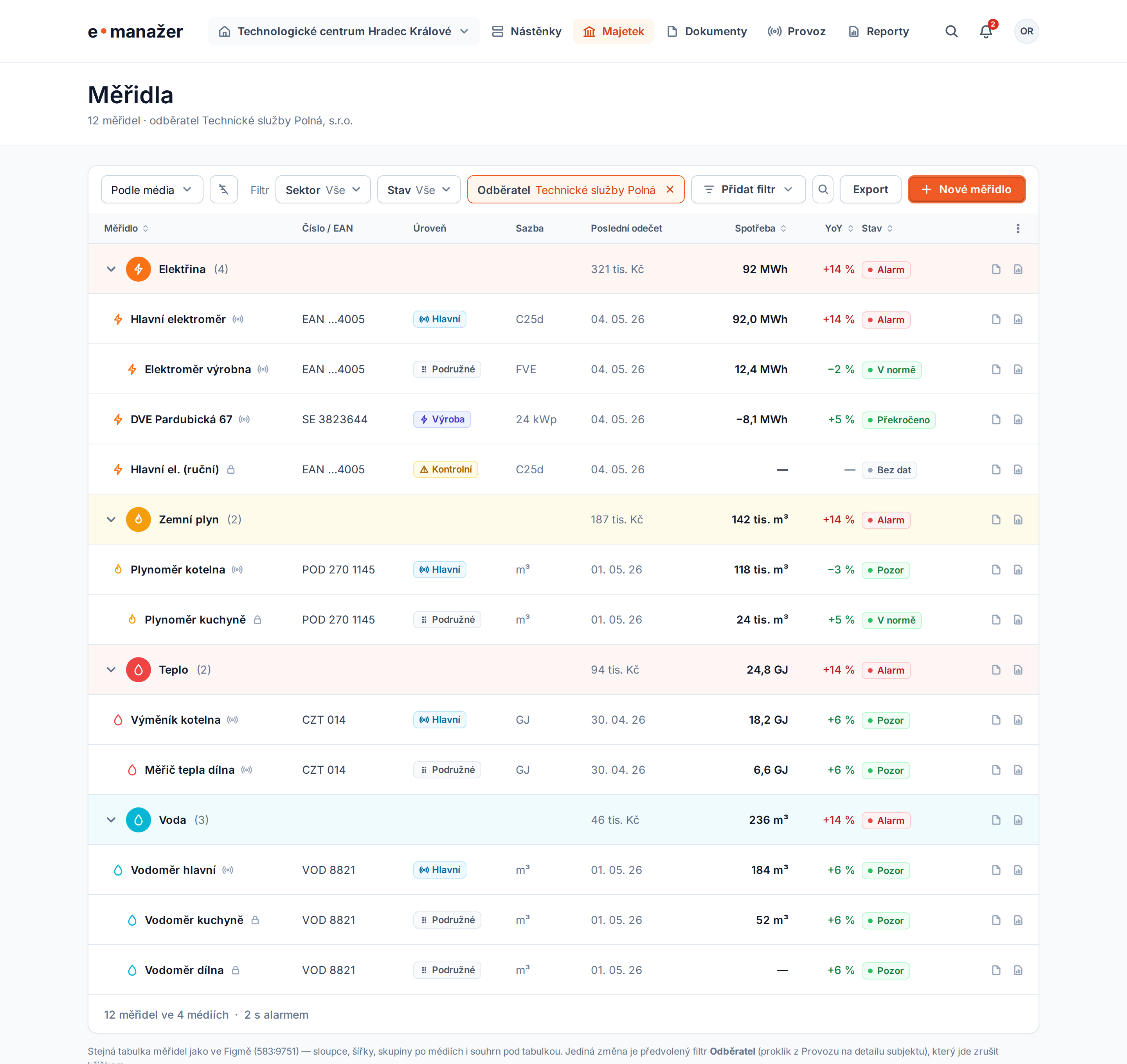
Supply points. Zobrazit next to Počet OM s odběrem opens the gauge overview (Majetek › Měřidla, /gauges) with the subscriber filter preselected. That page is unchanged; the only addition is one more filter, Odběratel, a removable chip carrying the subject's name (subscriber plus hasSupplyPoint=true; see api-a.md). The registry adds no export of its own there.
Per-record history wireframe. The Detail card header carries a "Historie" button onto the subject's own change history (organisation), composed onto this existing detail screen rather than a redesign: design/html/subjekty-detail-s-historii.html (see Audit Log — Per-Record History component).
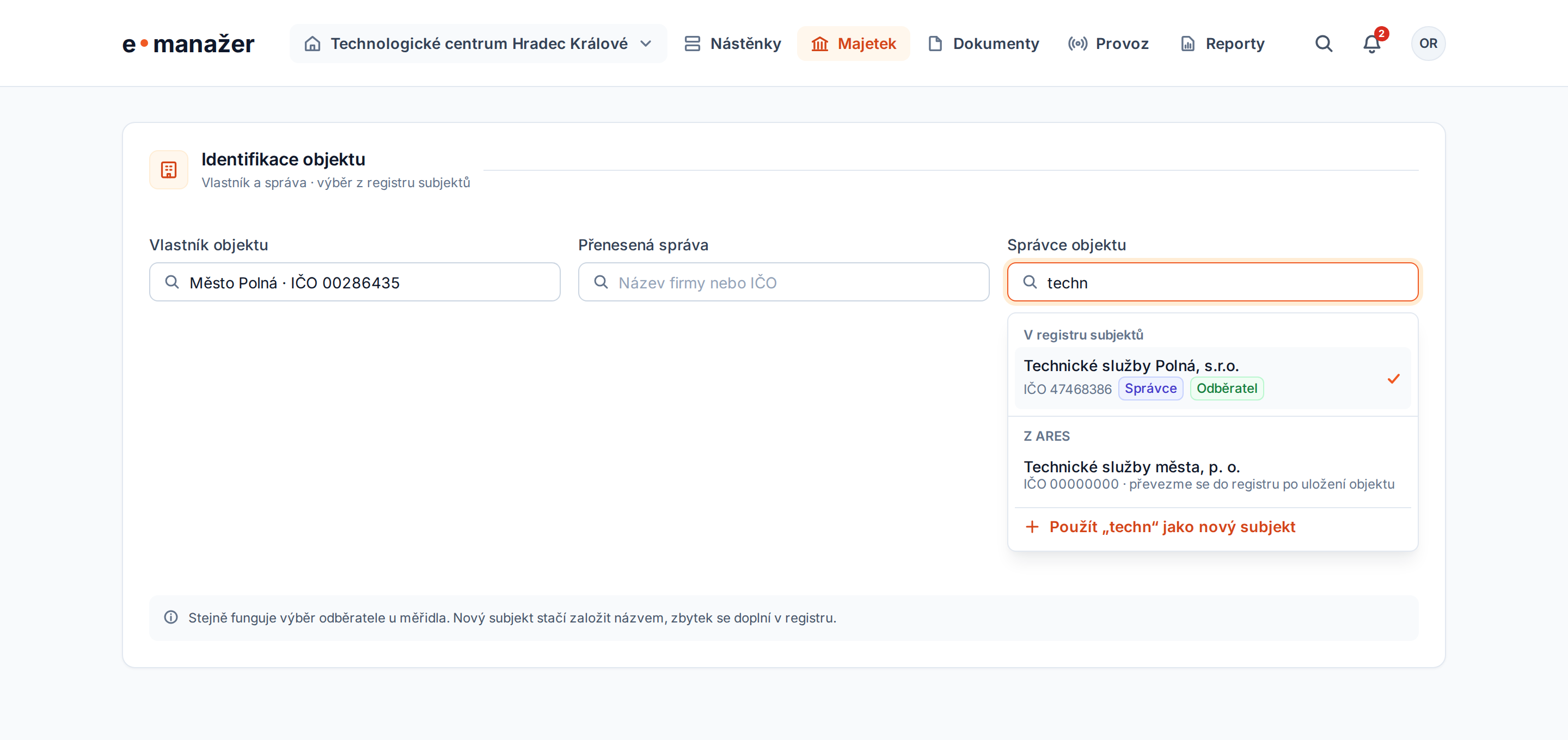
Picking a subject elsewhere. The building's owner / manager / delegated-manager fields and the gauge's subscriber use one combobox: registry matches with their role badges, then ARES matches, then "use the typed text as a new subject". An ARES or typed pick enters the registry on save.
| State | What is shown |
|---|---|
| Empty registry (only the client's own subject) | One row; empty-state hint under the table pointing to Přidat subjekt |
| ARES unavailable | Notice in the add dialog and in the combobox; manual entry stays available |
| No filter match | "Žádný subjekt neodpovídá filtrům" with Zrušit filtry |
Functional Requirements
- FR-1 One registry. Every organisation and natural person the client refers to is one
organisationrecord of the tenant. - FR-2 Required data. Only
nameis required.ico, when present, is 8 digits and unique among live subjects of the tenant. - FR-3 Legal form is the type.
legalFormis optional, used only for display, filtering and sorting, and carries the ARES legal forms; a subject ARES does not know keeps it empty. - FR-4 Derived roles. A subject's roles are the reference roles it currently has:
owner,manager,delegatedManager(live buildings),subscriber(live gauges), plus own subject whenisSelf. They are never stored or entered; there is no lessee role, because nothing in the product creates a lease link. - FR-5 All roles visible. The overview, the detail header and the subject picker show every role the subject has, in the order of FR-4's display list.
- FR-6 Role filter. The overview accepts several roles; a subject matches if it has at least one of them.
- FR-7 Link counts. Overview and detail count live owned, managed and delegated buildings, subscribed gauges and distinct supply points.
- FR-8 Drill-down. Each count in the detail links to the building overview, or to the gauge overview as Odběrná místa, filtered to this subject and role.
- FR-9 ARES. ARES prefills name, legal form, IČO, DIČ, address and data box; it is never required.
- FR-10 Duplicate IČO. An IČO held by another live subject is rejected on create and update; the UI links that subject.
- FR-11 Deletion. A deleted subject leaves the overview and every picker, stays readable in history, and frees its IČO for a new subject. The client's own subject, and any subject with a live reference, cannot be deleted; the UI lists the references.
- FR-12 "K řešení". The K řešení value of the Stav filter, and the yellow dot, mark live subjects with an open alarm or notification about their data. The registry does not define the rule — the alarms and notifications domain decides what qualifies and exposes the flag.
- FR-13 Export. Only the overview has an export. It exports every subject matching the current search and filters, regardless of paging, with no row selection: visible columns by default, Úplný export on request, roles in one cell separated by
;. Billing, bank and contact-person fields requiretenant.organisations.write. - FR-14 E-mail. A subject has one optional e-mail of its own (E-mail), independent of its contact persons.
- FR-15 History. The detail header carries a "Historie" entry point onto the subject's own change history, reached in place — the same audit trail as Audit Log.
Internationalization & Localization
Labels in Czech and English through the frontend locale files (client.tabs.subjekty already exists). Role labels: Vlastní subjekt klienta / Own subject; Vlastník / Owner; Přenesená správa / Delegated manager; Správce / Manager; Odběratel / Subscriber; Bez role / No role.
Role badges. The Untitled UI Badge, type color, size md (sm in the picker), one colour per role, in the overview column, the detail header, Provoz and the picker.
| Role | Badge colour |
|---|---|
| Vlastní subjekt klienta | orange |
| Vlastník | blue |
| Správce | indigo |
| Přenesená správa | purple |
| Odběratel | success |
Non-Functional Requirements
- The overview answers within the tenant's usual list budget for 10 000 subjects; role flags and counts are computed in the list query, not per row.
- Export runs over all matching rows regardless of paging.
Performance
The list query aggregates references with one grouped subquery per referencing table (building, gauge), joined to the page of subjects. The existing indexes on building.owner_id, building.manager_id, building.delegated_manager_id and gauge.subscriber_id serve the aggregation.
Transactional Operations
Deletion keeps its single-transaction guard: the subject row is locked FOR UPDATE, the self-flag and references are checked, then the row is soft-deleted.
Processes & Related Systems / Components
- ARES (External Integrations — ARES) through
GET /v1/organisations/autocompleteand the ARES lookup. - Building Management and Gauge Management own the references.
- Table View Settings provides column settings and the export contract for the overview.
- Users & Access provides the users for the contact persons.
Diagrams & Models
flowchart LR
  B[building] -- owner_id / manager_id / delegated_manager_id --> O[organisation]
  G[gauge] -- subscriber_id --> O
  O -- derived --> R
  G -- supply_point_id --> SP[(supply point)]
API Analysis
See api-a.md. Existing endpoints under /v1/organisations are kept; the list gains roles, counts, multi-role and legal-form filters, sorting and an export; create and update accept email.
Domain Model (ER diagram) & Data Attribute Table
erDiagram
  organisation ||--o{ building : "owner / manager / delegated manager"
  organisation ||--o{ gauge : "subscriber"
  user |o--o{ organisation : "contact persons"
Entity: organisation — gains email.
Data
No new table. One new nullable column organisation.email.
Test Data
The client's own subject; one subject per single role; one subject with a delegated-manager link only; one subject with owner + subscriber; one subject without references; one natural person without IČO; one soft-deleted subject.
Logging
Create, update and delete are audited through the audit log adoption for organisation.
Monitoring
N/A — no new background process.
Caching
None.
Backward Compatibility and Migration
The list response gains fields; existing callers ignore them. role as a single query value keeps working (a one-element list).
Distribution registry
Not analysed yet. Carried-over finding (Epic 1.5, Confluence 650706947, item 5): the previous system keeps several parallel supplier/distributor registries (Gauge\Supplier, GasSupplier, ElectricitySupplier, Distributor, pd_distributor). Recommendation: GasSupplier becomes GasDistributor; ElectricitySupplier and pd_distributor merge into one distributor model; commodity suppliers stay in Person & Contract Management as contractSupplier.
Legal Context
Natural persons' names, addresses and bank accounts are personal data. They are exported only on explicit choice (FR-13) and only to users allowed to edit subjects.
Cybersecurity Considerations
- Row-level security on
organisationisolates tenants; every reference count is computed inside the same tenant context, so a count never includes another tenant's buildings or gauges. - Permissions
tenant.organisations.read,tenant.organisations.writeandtenant.organisations.deleteguard the endpoints. The export applies the same permissions per column, so a read-only user cannot obtain billing, bank or contact-person data through a file. - XLSX cells that start with
=,+,-or@are written as text to prevent formula injection from subject names typed by users.
Risk Assessment
Business Risks
- K řešení depends on the alarms and notifications domain: the registry shows the state but does not decide it, so the filter value and the status dot wait for that domain.
Technical Risks
- Aggregating references in the list query on large tenants — mitigated by the grouped subqueries and existing indexes.
Auditing, Reporting & Measurement
- Create, update and delete of a subject are written to the audit log (actor, time, changed fields), so a changed IČO or bank account can be traced.
- Exports are logged with the actor, the filters, the row count and whether a full export with restricted columns was chosen.
- Product measurement: share of subjects without any reference (registry hygiene) and the number of subjects in K řešení over time.